
1. If you're not already there, head to v2.per4mance.io or log into the Per4mance iPhone or Android app.
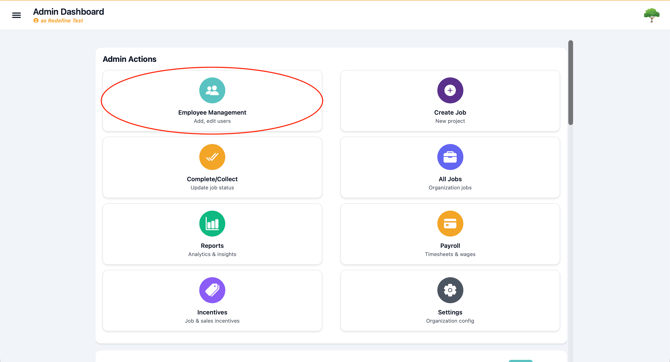
2. Click on "Employee Management" found on the top left of your dashboard. This can also be accessed via the "hamburger" or three horizontal lines on the top left of the screen.
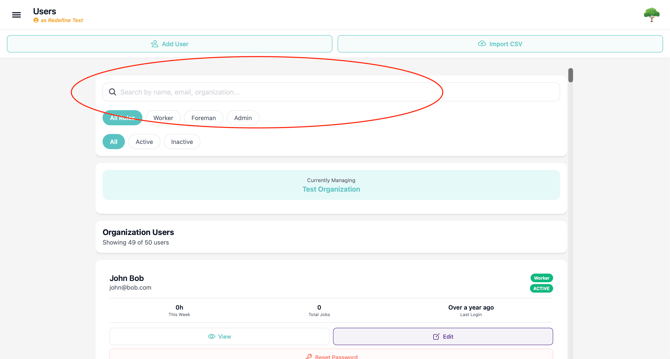
3. Find the employee you want to change the password for using the search and filter.
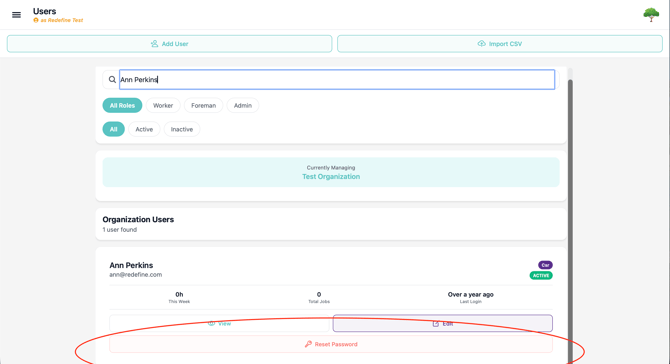
4. Select ‘Reset Password’ for the user you want to reset the password for.
We highly recommend using a password manager, as most of built services on device do a great job using strong, unique passwords, without you having to remember your login!
Issues?
-
Still not able to edit employee information? Something may be wrong. Submit a ticket here or book support meeting.
- Is this article out of date? Submit a ticket to tell us.