
We have 5 typical roles with Per4mance.io:
-
Admin+ - Manages multiple locations/admins.
-
Admin - Manages a location, its jobs, and all its users.
-
Foreman - Manages jobs and workers assigned to them by Admin.
-
Worker - Manages self.
-
Sales - For reporting only (more features coming soon).
-
Office - For office staff to log hours (more features coming soon).
-
Customer Service Rep - For staff to log hours (more features coming soon).
For Admin+, these are set up with the creation/support of your account. Reach out to hello@per4mance.io if you need assistance here. For the rest, you can follow these steps.
1. If you're not already there, head to v2.per4mance.io or log into the Per4mance iPhone or Android app.
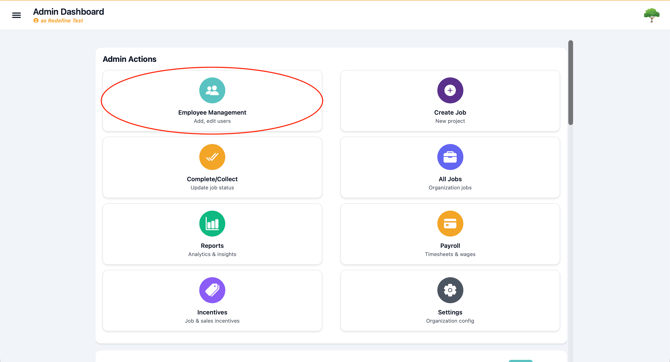
2. Click on "Employee Management" found on the top left of your dashboard. This can also be accessed via the "hamburger" or three horizontal lines on the top left of the screen.
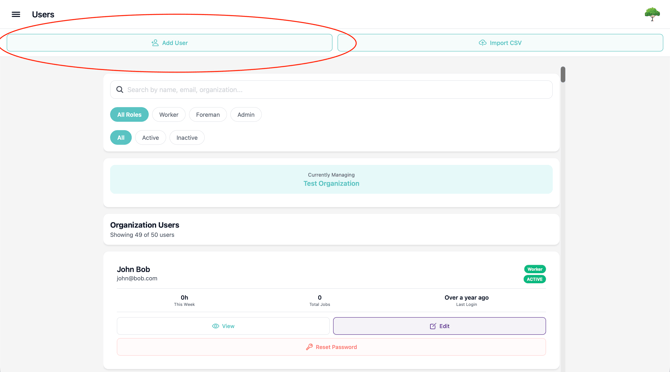
3. Click "Add User" found on the top left corner of your screen.
4. Input in the employees details. Assign them a Type according to what permissions you want them to have.
Emails must be unique per user. If you're unable to create a user, they may already exist in your system. Check for Inactive users too, which can be made Active again.
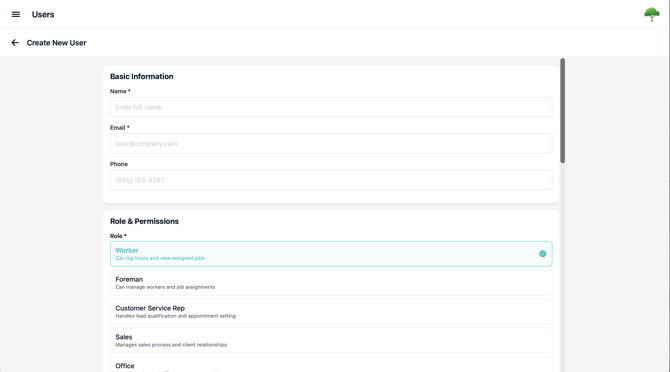
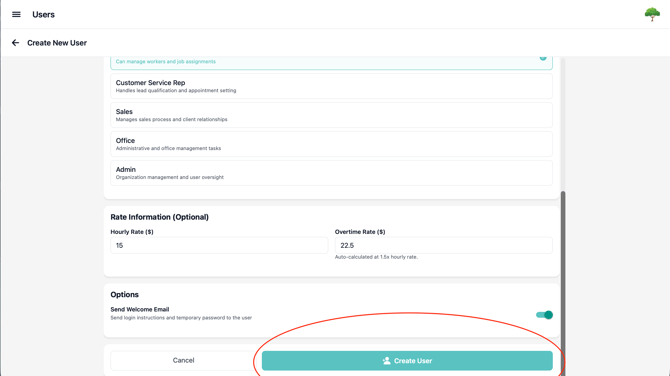
Hourly rates are not just for calculating hourly wages, these are the rates charged against budgets when hours are logged on Jobs.
5. Click or tap "Create User" at the bottom to finalize the employee's account.
Issues?
-
Still not able to edit employee information? Something may be wrong. Submit a ticket here or book support meeting.
- Is this article out of date? Submit a ticket to tell us.