
1. If you're not already there, head to go.per4mance.io or log into the Per4mance iPhone or Android app.
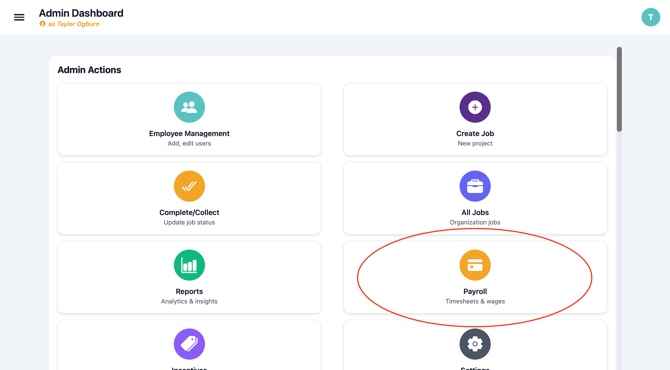
2. Click on "Payroll" found on the top right of your dashboard. This can also be accessed via "Jobs" in the three horizontal lines on the top left of the screen.
3. Click on the type of CSV you'd like to export and it will download automatically.
.png?width=670&height=591&name=payroll.PNG-mh%20(1).png)
Filters: To choose which employees appear in the CSV, select a filter option. Then click the CSV type you want to export. The downloaded file will include only employees who match the selected filter.
Issues?
-
Still not able to export Payroll information? Something may be wrong. Submit a ticket here or book support meeting.
- Is this article out of date? Submit a ticket to tell us.
Related Articles
- How do I remove hours from an existing Job?
- How do I add a worker to a Job?
- How do I replace the Foreman assigned to a Job?